
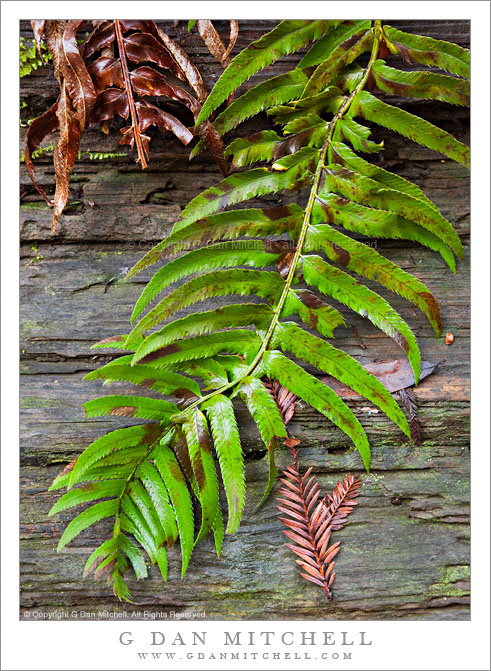
Fern and Redwood Log. Muir Woods National Monument, California. December 16, 2010. © Copyright G Dan Mitchell – all rights reserved.
A fern drapes across a redwood log littered with leaves and needles at Muir Woods National Monument.
I’m always a sucker for the interesting forms of the ferns in the redwood forest, here at Muir Woods National Monument and elsewhere. This curving example was lying across the surface of an old, dead fallen redwood trunk, and was accompanied by some brown ferns, a few odd redwood needles, and what I think may be a brown bay leaf.
Although this was shot near the very end of fall, the atmosphere at Muir Woods was very much that of winter. There was just a bit of thin fog floating around here and there, and on the forest floor beneath the giant trees it was very damp and quiet and dark. (If you want evidence of the low light… note that this was a 15 second exposure!)
This photograph is not in the public domain and may not be used on websites, blogs, or in other media without advance permission from G Dan Mitchell.
G Dan Mitchell Photography
Flickr | Twitter | Facebook Fan Page | Facebook | Friendfeed | Email
Hi Dan,
I’ve been following your blog for some time now–I really love your stuff and your insight, especially how you compose an image in your head before ever actually touching the shutter. As an amateur trying to improve, I often look at your technical data, but one thing I’m always curious about is when the photo was taken (time of day). I know you often explain roughly when in your explanation and it’s fairly self explanatory for sunrise and sunset shots, but for mid-day shots, I think it would be really useful.
Anyway, is there a chance you might be able to add the time your photo was taken to your technical data?
Thanks and Cheers,
Gabriel
Thanks for writing, Gabriel – and thanks for your comments!
The time and date (and other information) is part of the “EXIF” data that is embedded in the jpg images that I use at the site. There are some browser add-ons that you can apply that will let you see the EXIF. In Firefox you can add on something called “FxIF” to display it in a small window. (Search on “EXIF” in the extensions/add-ons window in Firefox’s “Tools” menu.) As a Mac user I often use Safari as my browser. Go to Safari preferences and then select extensions. From here you can find and download browser extensions like “ExifExt,” which I use to right click and see the EXIF data.
Hope that helps!
Dan