“Two Towers” — Two backlit sandstone towers, Grand Staircase-Escalante National Monument.
Stopping to photograph these formations was almost an afterthought. We had been far down a remote road in the Grand Staircase-Escalante National Monument photographing even more obscure locations, and we were headed back towards Escalante. Not being familiar with this area back then, I was surprised when we stopped here along the way, but then this little red rock garden began to attract me.
This is the time of year when people plan their summer travels. Recently I’ve noted people trying to figure out what gear will work for photography while traveling, what kind of camera and what lenses to take. What is the best approach? Take the whole kit? Just use your smartphone? Get something special just for travel photography?
I do a fair amount of travel photography, and I wrote an article sharing some of my ideas: Travel Photography Gear. Click the link and take a look!
“Je Suis Bleu” — Sidewalk, graffiti covered wall, and women (virtual and real) on a Paris street
A starting assumption: There is no one “right” or “best” approach to photography while traveling, and what works for me may be far from ideal for you. It depends a lot on your goals and the role photography plays in your travels. The article explores some of the options and variables.
I’m hopeful that this article may help you figure out what will work for you.
COMMENT OR QUESTION? Scroll down to the comment form.
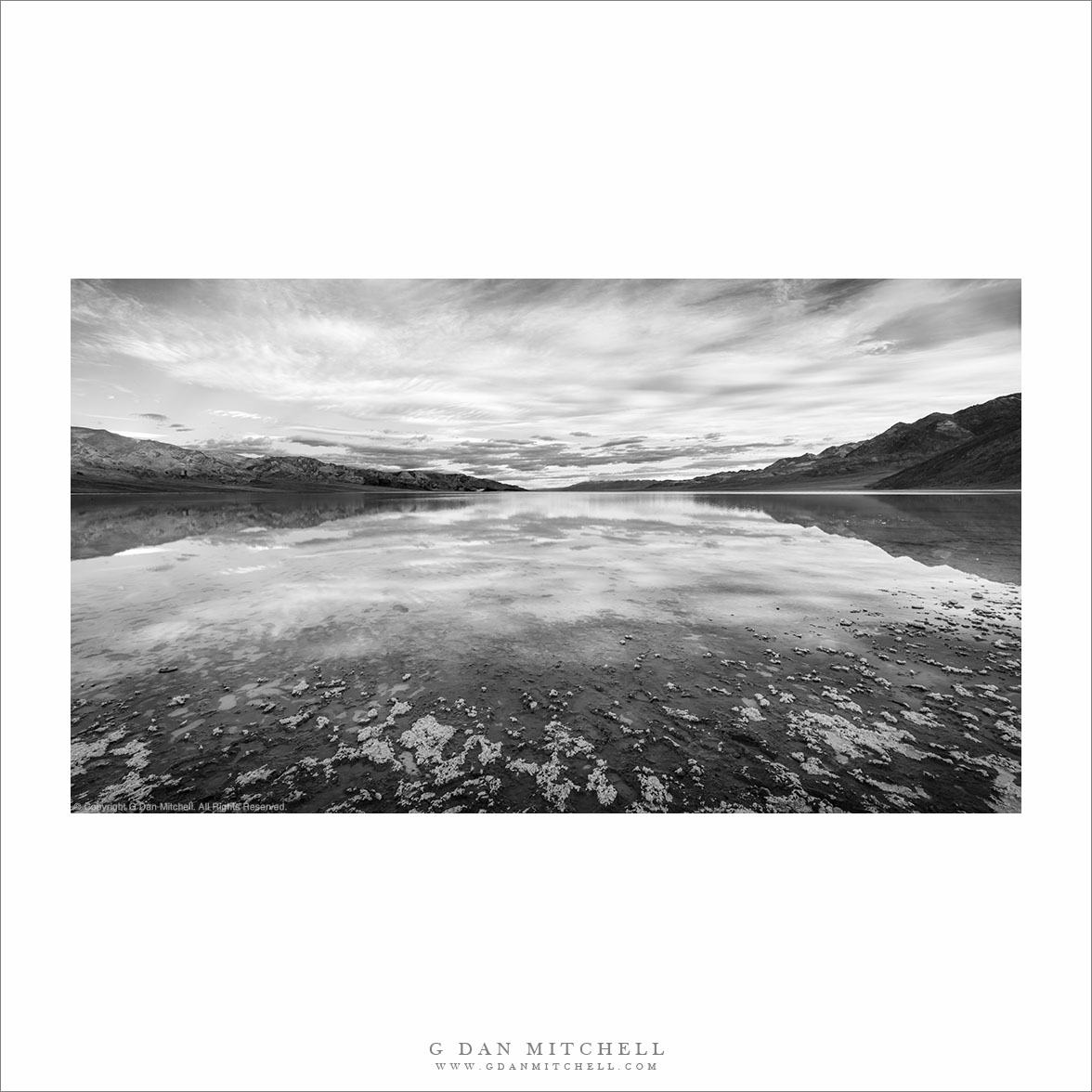
“Lake Manly Shoreline” — From the shoreline of Lake Manly to distant desert mountains under morning clouds.
A spectacular cloud deck floated above Death Valley on this winter morning. While the clouds were a bit too thick to let brilliant sunrise colors develop, they created a very dramatic sky and its reflection on the surface of Lake Manly. The photograph looks north across the lake from its salty southern shoreline.
In other photographs of this subject I have tried to to fill the frame with sky and reflecting water. In this case I decided to include some of the salt-crusted shoreline of the lake in the foreground, and I used a wide angle lens in order to include more of the scene, and especially the sky.
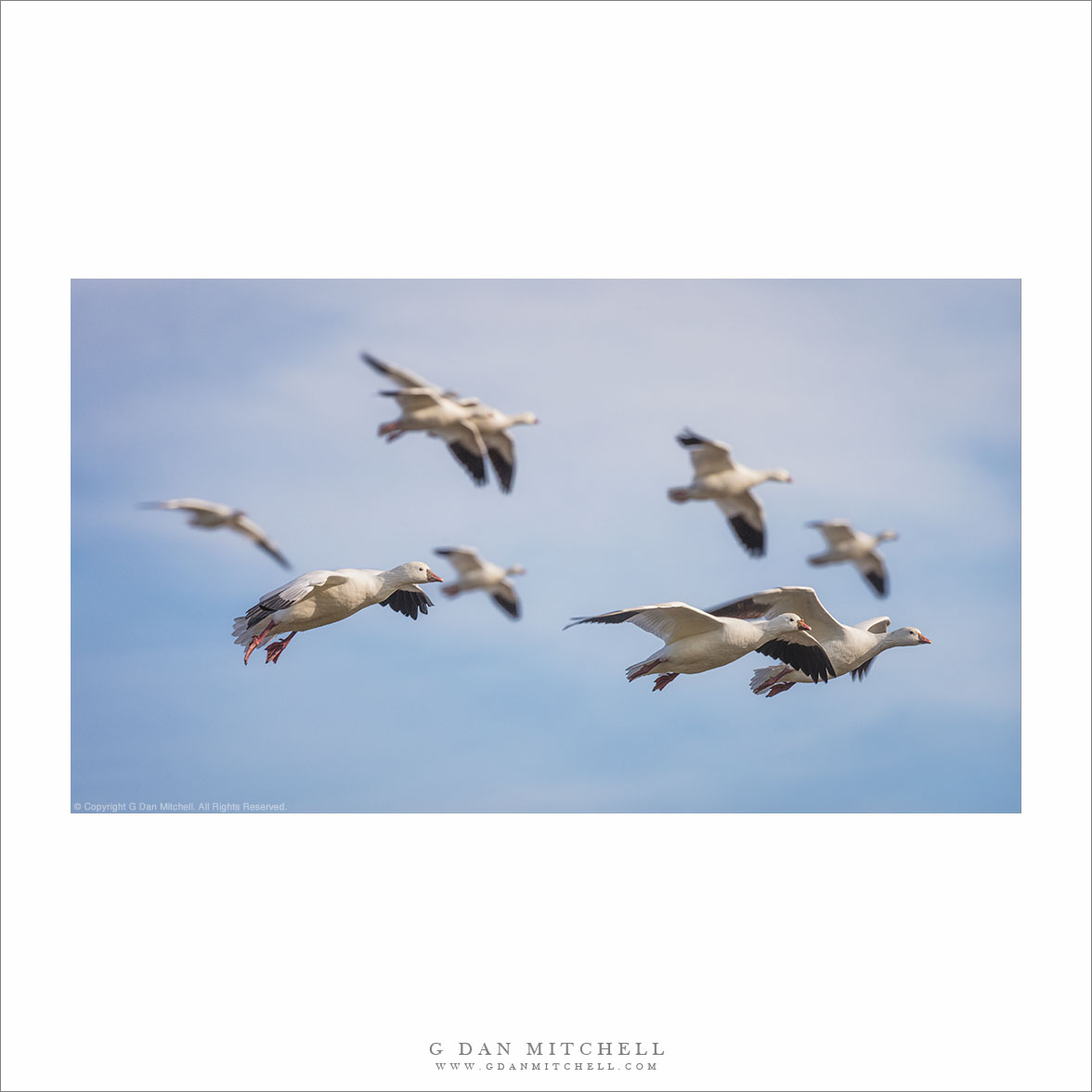
“Ross’s Geese in Flight” — Ross’s geese descend toward a wetland pond.
(I haven’t shared a Morning Musings post in months, so it seems like this one is overdue!)
Sharing this photograph got me thinking again about how many aspects of photography are usually beyond our control. Consider all of the things that come together in this photograph:
I was at a location with an area of perhaps 4 or 5 square miles, and at this place there are many locations from which I could photograph. It just so happened that I was at the right spot when a flock of geese lifted off and then returned.
The light filled shadows and didn’t overpower white highlights because there was a bit of thin overcast.
I was upwind of the birds so their landing pattern brought them down facing my direction.
The three sharply focused foreground birds aligned with a group of six birds a bit farther away and beyond the plane of focus.
Each bird’s head is visible, with none blocked by other birds.
A lighter area of sky is centered beyond the birds, making them a bit more distinct, and this is roughly encircled by darker sky, focusing attention on the birds.
Looking more closely at the position of the birds, there is a mirrored pair at upper left. Two distant birds perfectly frame the single bird at lower eft. A pair of in-focus birds leads the group toward the lower ridge edge of the frame… with a pair of more distant birds right above them.
I could keep going, but you get the point.
In almost all photographs (aside from some fully constructed images perhaps) there are elements and conditions that are not under the direct control of the photographer: the weather, who walks by on a city street, wind, the time of day we when we show up, the mood of our subject, which way we happened to look, the season, whether something else we saw delayed our arrival, something we read or an idea mentioned by a friend, how he subject may or may not remind us of something we’ve seen before, how patient or impatient we feel, whether or not we notice something that was not what we came for. Sometimes an error produces a new idea that we had not thought of.
Again, I could keep going.
None of this is to say that we have no control over the nature of our photographs. Among many possible subjects, we pick some and ignore others. Given time we put more or less thought into elements of composition. We try to choose the times and places we think are most conducive to success. We bring equipment suitable to the opportunities and/or we adapt when the gear isn’t quite ideal. We bring our past experience with light and color and texture and composition… and with the subjects themselves.
Indeed, this list isn’t complete either.
Somewhere I recall reading that one difference (though not the only one) between painting and photographing is that, generally, every mark on the canvas was put there intentionally by the painter. In a sense, the parinter “knows” every detail. Photographers often discover things in their images that they had not even fully noticed, if at all, when they made the exposure.
There’s an old saying that we don’t takephotographs, but rather we makephotographs. This acknowledges the intentional choices and decisions that the photographer makes between the moment of seeing and ultimate act of printing. But if we are honest, unlike painters, we don’t literally make everything in a photograph. In fact we do take as a starting point what we are given, to a greater or lesser extent.
That taking is generally not random, and I don’t mean to minimize the role of intent in photography. If it were purely about taking, then all photographs and all photographers would be equal, and that is clearly not the case. Each photographer puts his or her own stamp on their taking. It is partly a matter of what we notice, but also of how we see. Two photographers who set up next to one another rarely produce the same photograph because each sees something different in what is in front of them, each is attentive to different details in the subject, one might be drawn to texture and another to color or form, each imagines a different final image.
It is important to know how to control and shape as many aspects of photograph-making as possible. Preparation and practice and experience are obviously important. But in the end, to a greater or lesser extent, as photographers we always work with what we are given or what we find, and it is largely about what we do with those things that we can’t control.
Photographer and visual opportunist. Daily photos since 2005, plus articles, reviews, news, and ideas.
Manage Consent
To provide the best experiences, we use technologies like cookies to store and/or access device information. Consenting to these technologies will allow us to process data such as browsing behavior or unique IDs on this site. Not consenting or withdrawing consent, may adversely affect certain features and functions.
Functional
Always active
The technical storage or access is strictly necessary for the legitimate purpose of enabling the use of a specific service explicitly requested by the subscriber or user, or for the sole purpose of carrying out the transmission of a communication over an electronic communications network.
Preferences
The technical storage or access is necessary for the legitimate purpose of storing preferences that are not requested by the subscriber or user.
Statistics
The technical storage or access that is used exclusively for statistical purposes.The technical storage or access that is used exclusively for anonymous statistical purposes. Without a subpoena, voluntary compliance on the part of your Internet Service Provider, or additional records from a third party, information stored or retrieved for this purpose alone cannot usually be used to identify you.
Marketing
The technical storage or access is required to create user profiles to send advertising, or to track the user on a website or across several websites for similar marketing purposes.